
This is an old revision of the document!
Homing
Homing means initialization of the boom, tower, telescope, arm and nozzle absolute positions. If the robot have lost its homing, you need to redo the homing procedure.
<font 16px/inherit;;inherit;;inherit>Symbol explanations:</font>
 = Homing needed.
 or
or  = Zero position sensor is active.
These symbols is shown at the function that it refers to.
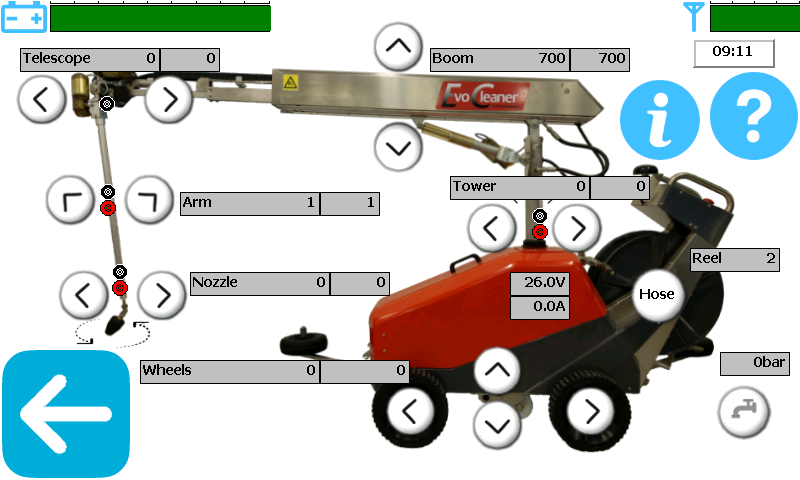
Instruction
<font 12.0pt/Arial,Helvetica,sans-serif;;inherit;;inherit>1. </font><font 12.0pt/Arial,Helvetica,sans-serif;;inherit;;inherit>From the start screen, go to manual screen.</font>
<font 16px/inherit;;inherit;;inherit>2. Press the</font> -button (information / detailed view) <font 16px/inherit;;inherit;;inherit>on the top right corner so you can see the absolute positions for all functions.</font>
<font 12.0pt/Arial,Helvetica,sans-serif;;inherit;;inherit>3. Move the boom to the absolute bottom. Check that the position is zeroed (or +1) automatically when it stops at the bottom. If not zeroed, continue to hold the boom down-button until you receive a question. Call Envirologic or your distributor for further support.</font>
<font 12.0pt/Arial,Helvetica,sans-serif;;inherit;;inherit>4. Move the tower twice in each direction, passing the home position sensor. The sensor indicator is active when showing black (or grey) on your screen. The red homing indicator disappears when the homing is done.</font>
- <font 12.0pt/Arial,Helvetica,sans-serif;;inherit;;inherit>a. Check that the sensor is active when the tower points forward.</font>
- <font 12.0pt/Arial,Helvetica,sans-serif;;inherit;;inherit>b. Move the tower to the left, about 20 degrees, until the sensor indicator becomes inactive.</font>
- <font 12.0pt/Arial,Helvetica,sans-serif;;inherit;;inherit>c. Move the tower to the right until the sensor indicator becomes active and then inactive again.</font>
- <font 12.0pt/Arial,Helvetica,sans-serif;;inherit;;inherit>d. Repeat the sweep to the left and to the right.</font>
- <font 12.0pt/Arial,Helvetica,sans-serif;;inherit;;inherit>e. Move back so the tower points straight ahead.</font>
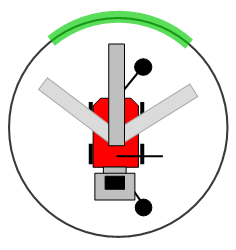
<font 12px/inherit;;inherit;;inherit>Green = Active sensor area</font>
<font 12.0pt/Arial,Helvetica,sans-serif;;inherit;;inherit>5. Move the telescope outwards a few decimeters and then fully back in again.</font>
- <font 12.0pt/Arial,Helvetica,sans-serif;;inherit;;inherit>a. Check that the position is zero when the telescope is fully retracted.</font>
- <font 14px/inherit;;inherit;;inherit>b. </font><font 16px/inherit;;inherit;;inherit>Check that the zero position sensor is active when the telescope is at zero (fully retracted).</font>
<font 12.0pt/Arial,Helvetica,sans-serif;;inherit;;inherit>6. Move the arm twice in each direction, passing the home position sensor in both directions.</font>
- <font 12.0pt/Arial,Helvetica,sans-serif;;inherit;;inherit>a. Check that the sensor is inactive when the arm is parallel with the boom</font>
- <font 12.0pt/Arial,Helvetica,sans-serif;;inherit;;inherit>b. Move the arm outwards, past 30 degrees, until the sensor indicator becomes active and then inactive again</font>
- <font 12.0pt/Arial,Helvetica,sans-serif;;inherit;;inherit>c. Move the arm inwards until the sensor indicator becomes active and then inactive again</font>
- <font 12.0pt/Arial,Helvetica,sans-serif;;inherit;;inherit>d. Repeat the sweep outwards and inwards until the red homing symbol disappears.</font>
- <font 12.0pt/Arial,Helvetica,sans-serif;;inherit;;inherit>e. Move the arm back to parallel with the boom.</font>
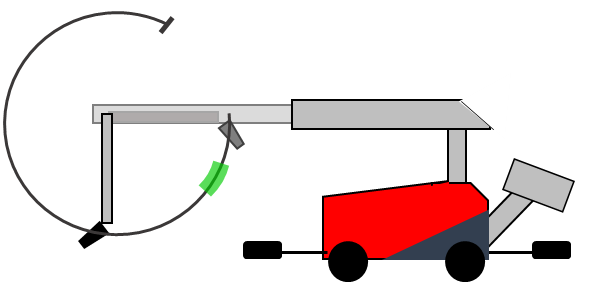
<font 12px/inherit;;inherit;;inherit>Green = Active sensor position</font>
<font 12.0pt/Arial,Helvetica,sans-serif;;inherit;;inherit>7. Move the nozzle at least two full revolutions in each direction (first, move the arm out so the nozzle is clear from the boom).</font>
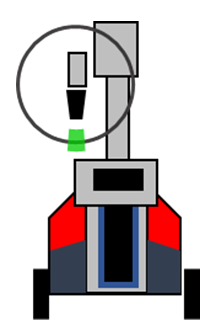
<font 12px/inherit;;inherit;;inherit>Green = Active sensor position</font>
<font 12.0pt/Arial,Helvetica,sans-serif;;inherit;;inherit>8. Make sure that all red homing dots have disappeared.</font>
- <font 12.0pt/Arial,Helvetica,sans-serif;;inherit;;inherit>a. If not, retry the homing for the function that has a red homing dot (you might have missed one sweep past the zero sensor).</font>
<font inherit/Arial,Helvetica,sans-serif;;inherit;;inherit>Still having problems even after homing? Your robot could also have lost its parking positions. Contact Envirologic or you distributor for further assistance.</font>